Features
Everything you need.
Complete financial awareness — from invoice scanning to spending insights, all in one place.
The best way to experience your expenses
View all your invoices in their ideal format. Full rich media support in one beautiful interface.

Smart Subscriptions
All your active subscriptions in one place. Subscription insights and price change reminders are coming soon.
Human-Readable Data
No more confusing spreadsheets. Your spending is broken down to be readable at a glance.
Comments
Leave notes on any invoice or expense. Improved and redesigned — faster, cleaner, more useful.
Invoice Editing
Made a mistake? Edit any invoice or expense entry at any time — amount, date, category, all of it.
Delete
Remove any invoice or expense from your records entirely. Clean up your data, your way.

Find anything in seconds
Full-text search across your entire history. Filter by vendor, amount, or date.
Swipe-based interfaces
Canvas Views
Navigate your finances through immersive, gesture-driven interfaces. Swipe through Speed Tour, Timeline, and Map views for a completely new way to see your data.


Find any invoice instantly
Invoice Search
Powerful search across all your invoices. Search by vendor, amount, date, or any detail. Advanced filters let you drill down to exactly what you need.

Spending clarity
Know where your money flows
Turn confusing bank statements into clear visual insights.
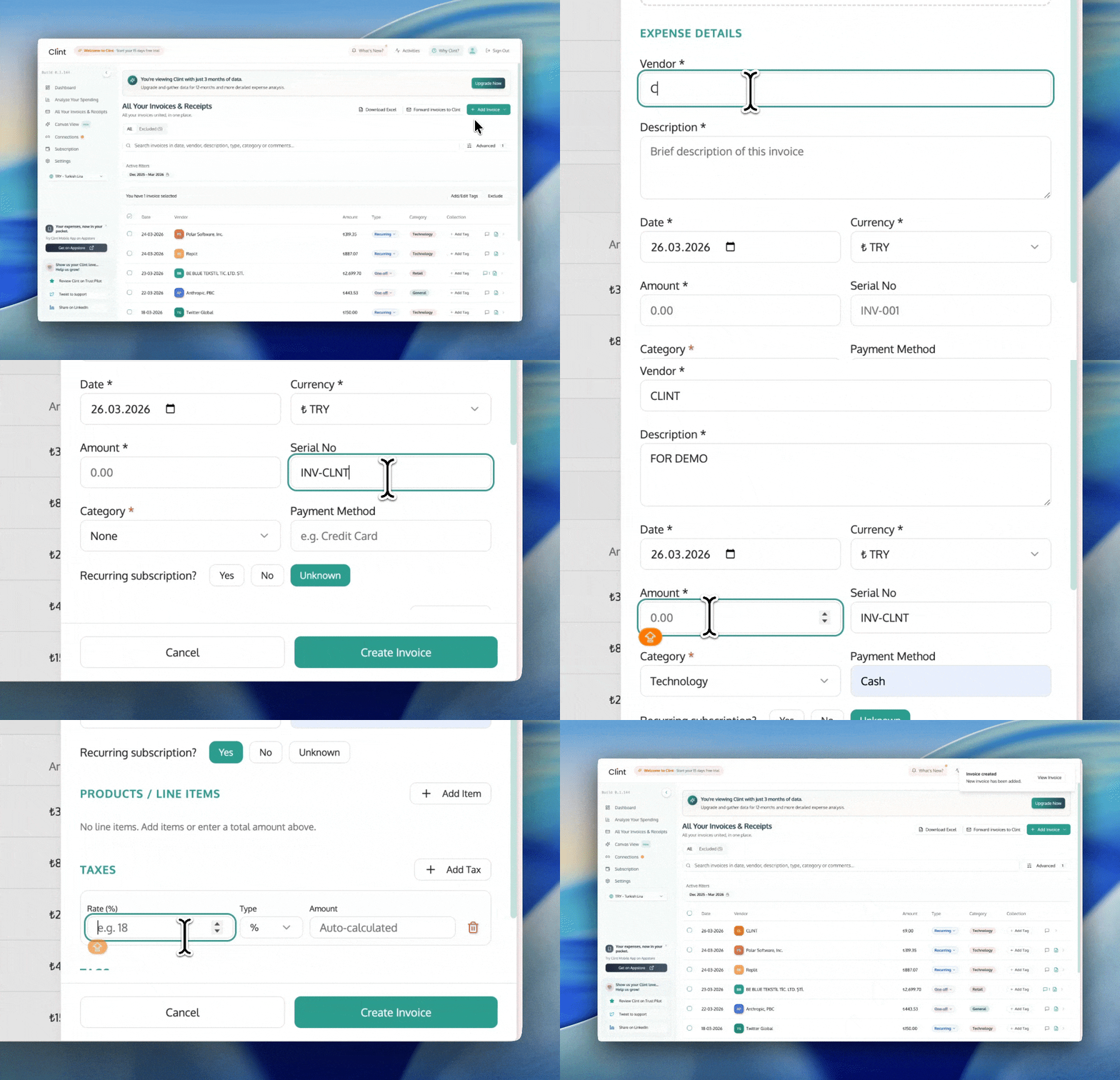
Manual Invoice Entry
Add any subscription or expense manually — no email required. Just fill in the details and Clint tracks it for you.
Google Drive: Your Newest Source.
Stop uploading invoices one by one. Link your Google Drive and let Clint automatically sync invoices from your chosen folders.
Connect Drive
Seamless across devices
Scan, search, organize. All in one place.
Access your financial data from any device. The full Clint experience on web, with the mobile app in beta via TestFlight.


FAQ
Frequently asked questions
Clint connects to your Gmail and Google Drive to automatically find and scan invoices. We use advanced parsing to extract vendor names, amounts, dates, and line items — all in the background, without any manual work.
Yes. With Manual Invoice Entry, you can add any subscription or expense by hand — no email required. Just fill in the details (vendor, amount, date, category) and Clint tracks it alongside your automatically scanned invoices. You can also upload a PDF or photo and let Clint parse it for you.
Absolutely. Invoice Editing lets you update any field on any invoice at any time — amount, date, category, vendor name, or notes. Whether it was scanned automatically or added manually, nothing is locked.
Yes. You can permanently delete any invoice or expense entry from your records. This removes it from your history, totals, and analytics entirely — useful for duplicates, test entries, or anything you want to clean up.
Yes. The Comments feature — recently redesigned to be faster and cleaner — lets you leave notes on any invoice or expense. Use it for context, reminders, tax annotations, or team communication.
Absolutely. Clint is CASA-audited and fully compliant with Google's API policies. We use read-only access and never store your email credentials. Your data is encrypted in transit and at rest.
Canvas Views are immersive, swipe-based interfaces that let you explore your finances visually. Speed Tour gives you a quick overview, Timeline shows spending over time, and Map displays where your money is going geographically.
Yes. Clint offers full-text search across all your invoices. You can search by vendor name, amount, date, or any detail within the invoice. Advanced filters let you narrow results even further.
Connect your Google Drive and select folders where you store invoices. Clint will automatically scan and sync those folders in the background, so your records stay up to date without any extra steps.
Smart Subscriptions automatically detects recurring charges in your invoices. It tracks renewals, alerts you to price changes, and sends reminders before upcoming charges so you're never caught off guard.
Yes — Clint is available on iOS. You can download it from the App Store or try the latest build on TestFlight. The web app is also fully responsive and works great on any device.
Still have questions?
Get in touchReady to take control?
Join thousands of users who trust Clint for complete financial awareness.
Get started free